
Sometimes, the best way to test a platform is to build the "test harness" first. Antfarm Toolbox (toolbox.antfarm.management) is our public sandbox for testing those internal utilities.
Packaged up, polished, and released for free so other builders can use them too.
A full screen, workflow friendly interface for building, running, and sharing API test.
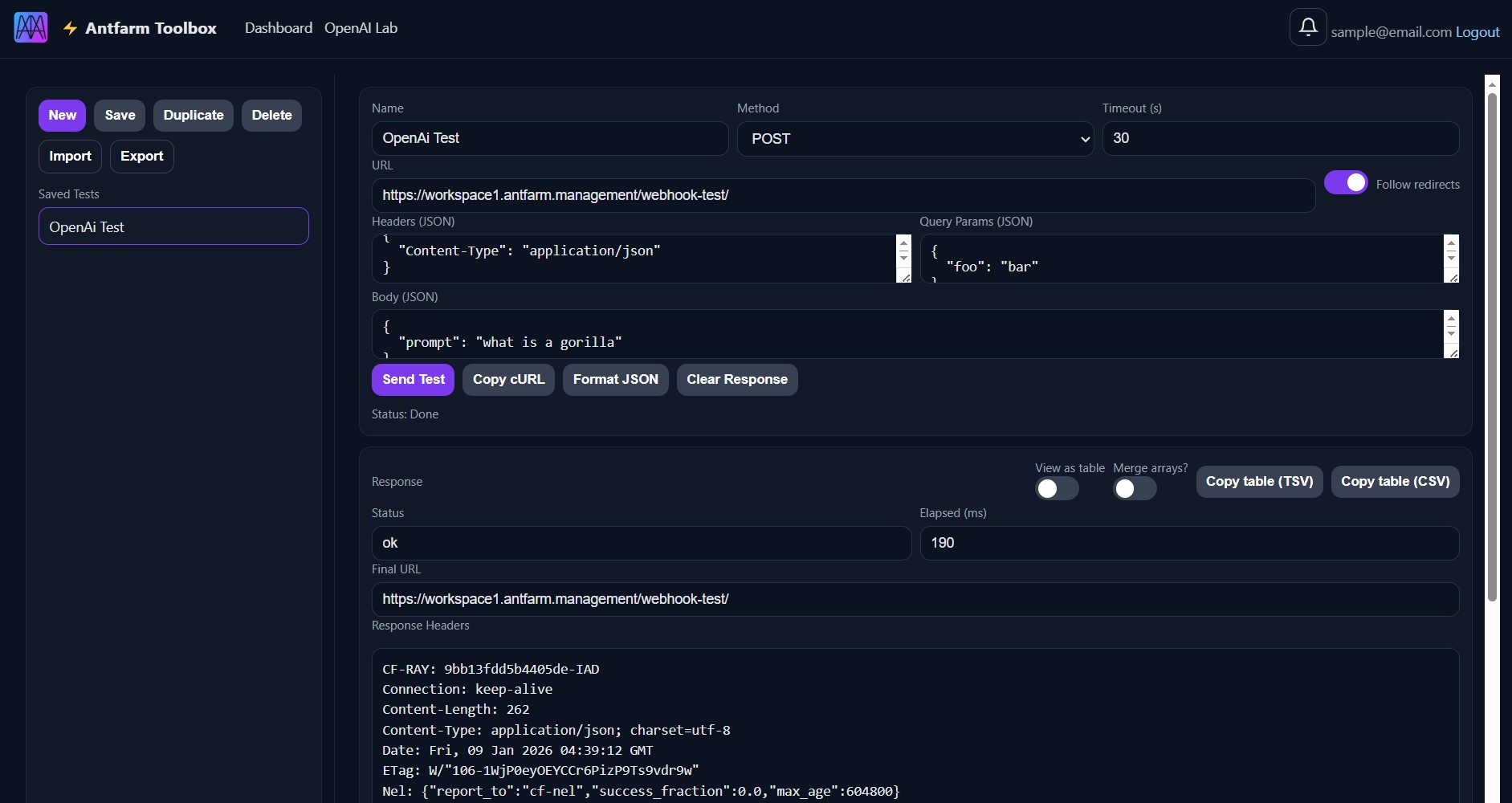
Create new tests, save edits, and manage your personal library. Export all saved tests as a single JSON file (or import one) to back up work and share workflows. Your saved tests appear in a scrollable list tied to your account.
Name your test and configure: HTTP method (GET / POST / PUT / PATCH / DELETE / HEAD), timeout, target URL, headers (JSON), query params (JSON), and body (JSON). Includes a toggle to follow redirects.
One-click controls to Send Test, Copy cURL, Format JSON, and Clear Response.
Displays status, elapsed time (ms), final URL, response headers, and body. Includes JSON table rendering + array merge options, plus export tools to copy the table as TSV or CSV.
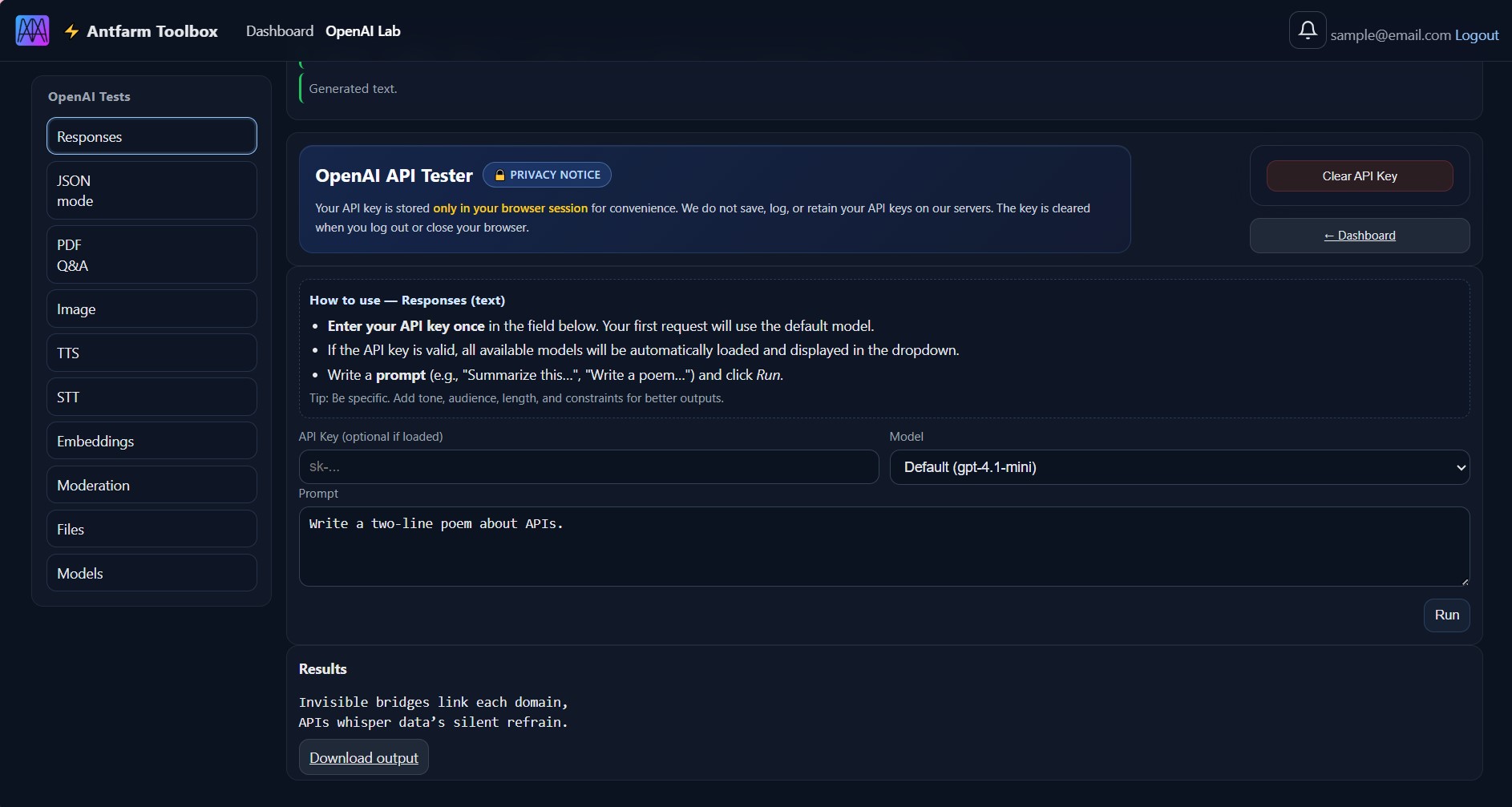
A multifunction lab for testing OpenAI endpoints in one place: text, JSON, PDFs, images, speech, embeddings, moderation, and file operations.
Privacy Notice:
API keys are never saved or stored. Your key lives only in your browser session for convenience. We do not log, retain, or persist keys on our servers. Keys are cleared when you log out or close your browser.
Model Auto-Discovery:
Enter your API key once. Your first request uses a default model; if the key is valid, we automatically load and display all available models across the lab.
Each section includes guidance, requires an API key, and runs actions. Results render inline, with download links for generated outputs where applicable.
Jump between: Responses (text), JSON Mode, PDF Q&A uploads, Image generation, Text-to-Speech, Speech-to-Text uploads, Embeddings, Moderation checks, Files management, and a Models list action.
Default Models:
Responses: gpt-4.1-mini
JSON Mode: gpt-4.1-mini
PDF Q&A: gpt-4.1-mini
Image: gpt-image
Text-to-Speech: gpt-4o-mini-tts
Speech-to-Text: gpt-4o-transcribe
Embeddings: text-embedding-3-small
Moderation: omni-moderation-latest
Write a prompt and run (best results: include tone, audience, length, and constraints).
Specify the structure you want (fields + types) and generate clean JSON output.
Upload a PDF, ask targeted questions, and get focused answers.
Generate images from detailed prompts (style cues encouraged).
Turn text into spoken audio—quick previews or longer narration.
Upload audio and transcribe (clean audio improves accuracy).
Embed text for search/retrieval workflows (use meaningful chunks).
Pre-screen text before saving, publishing, or displaying it.
Upload, list, download, or delete files by File ID.
Query available models and review IDs/owners/timestamps for configuration.